

You've invested time and money into building a website for your business. It looks professional, explains your services, and gives potential customers a way to contact you. But there's one problem: when you search for your business or services on Google, your website is nowhere to be found.
For Kansas City small business owners, this can be incredibly frustrating. After all, having a website doesn't do much good if potential customers can't find it.
Whether you operate a business in Kansas City, Overland Park, Olathe, Lenexa, Shawnee, or elsewhere in the metro, showing up in Google search results is an important part of attracting new customers.
The good news? There are several common reasons your business might not be appearing on Google, and many of them can be addressed through search engine optimization (SEO).
In this guide, we'll explore 10 reasons your Kansas City business might not be showing up on Google and what you can do to improve your visibility.
1. Your Website Hasn't Been Indexed by Google
Before your website can appear in Google search results, Google needs to discover and index its pages.
Indexing is the process Google uses to analyze website content and potentially include it in its search index.
If your website is new, recently redesigned, or experiencing technical issues, Google may not have indexed all your pages.
How to check if your website is indexed:
Go to Google and search:
site:yourwebsite.com
Replace "yourwebsite.com" with your actual domain.
If pages appear, Google has indexed at least some of your website. However, this search doesn't provide a complete or perfectly accurate list of indexed pages.
For a more reliable assessment, use Google Search Console's URL Inspection tool to check individual pages.
How to fix it:
Set up Google Search Console.
Submit your website's XML sitemap.
Check important pages using the URL Inspection tool.
Make sure your website isn't accidentally blocking search engines.
Request indexing for important new or updated pages when appropriate.
Keep in mind that requesting indexing doesn't guarantee a page will appear in search results. Google still evaluates whether the page should be indexed.
2. Your Website Isn't Optimized for Local Keywords
One of the most common SEO mistakes small businesses make is failing to clearly communicate where they operate and what services they provide.
For example, a website that simply says "Professional Website Design Services" may struggle to compete for searches related to website design in Kansas City.
A more locally relevant page might include phrases such as:
Kansas City website design
Website designer in Overland Park
Small business website design in Kansas City
These phrases help communicate the services and geographic areas associated with the business.
However, simply repeating "Kansas City" throughout your website won't automatically improve rankings.
Google evaluates content relevance, usefulness, and many other factors when determining which pages to display.
How to fix it:
Start by identifying the search terms your potential customers are likely to use.
Then incorporate relevant keywords naturally into your:
Page titles and meta descriptions
Main page headings
Website content
Service descriptions
Internal links
Image descriptions, where appropriate
For businesses serving multiple communities, clearly describe your actual service area rather than creating repetitive pages that only swap out city names.
The goal is to help Google and potential customers understand what you offer and where you operate.
3. Your Google Business Profile Is Missing or Incomplete
If your business isn't showing up on Google Maps or in local business listings, your Google Business Profile is one of the first places to investigate.
Google Business Profile is a free tool that allows eligible businesses to manage how they appear across Google Search and Maps.
Your profile can include important information such as your business name, phone number, website, hours, services, and photos.
An incomplete or inaccurate profile may make it more difficult for customers to find the information they need.
How to fix it:
If your business is eligible, create or claim your Google Business Profile and complete the verification process.
Then review the following:
Business name and primary category
Address or service area, as appropriate
Phone number and website
Business hours
Services and business description
Relevant photos
Customer reviews
Make sure your information is accurate and consistent with your website.
It's also important to understand that Google Business Profiles aren't available to every type of business. Eligibility generally requires in-person customer contact during stated business hours.
A complete profile doesn't guarantee top rankings, but it helps establish accurate information about your business.
4. Your Website Is Too New to Have Established Search Visibility
If you launched your website recently, it may take time for Google to discover, index, and evaluate your content.
A brand-new website typically has less established search visibility than a competitor that has spent years publishing useful content, earning relevant links, and improving its website.
This doesn't mean new businesses can't compete. It means that building organic visibility often requires patience and consistent effort.
How to fix it:
Focus on establishing a strong SEO foundation:
Create useful, well-structured service pages.
Make sure Google can access your website.
Connect your website to Google Search Console.
Publish content that answers customer questions.
Build relevant local relationships and earn legitimate links.
Monitor your website's search performance.
SEO is generally a long-term investment rather than an immediate source of traffic.
For more information, read our article on How Long SEO Takes for Small Businesses in Kansas City.
5. Your Competitors Have Stronger SEO
Sometimes your website is functioning properly, but competing businesses have invested more heavily in their online presence.
Imagine a Kansas City homeowner searching for "roof repair near me."
Google may have dozens of relevant roofing companies to consider. Businesses with strong websites, helpful content, established reputations, and relevant local signals may have an advantage.
Local search results are influenced by factors including relevance, distance, and prominence.
How to fix it:
Research the businesses currently appearing for your target keywords.
Look at:
The services and information featured on their websites
Their website structure and content
Their Google Business Profiles
Their customer reviews
Their location and service area
The types of websites linking to them
Use this research to identify opportunities to make your own website more useful and competitive.
The objective shouldn't be to copy competitors. It should be to create a better experience for your potential customers.
6. Your Website Doesn't Have Enough Helpful Content
Google needs sufficient information to understand what your website offers and which searches it may be relevant for.
A website with only a homepage and contact page may struggle to demonstrate the full range of services a business provides.
For example, a Kansas City landscaping company might offer lawn maintenance, landscape design, retaining walls, and seasonal cleanup.
If all those services are mentioned in one short paragraph, Google and potential customers may have difficulty finding detailed information about each service.
How to fix it:
Consider developing dedicated pages for your most important services.
Each page should explain:
What the service includes
Who the service is for
Common customer questions
What makes your approach different
How customers can get started
Blog content can also support your SEO strategy by addressing questions people search for before making a purchase.
For example, a landscaping company could publish articles about lawn maintenance costs, seasonal landscaping tips, or choosing plants for the Kansas City climate.
The key is to create genuinely useful information rather than publishing content solely to increase the number of pages on your website.
7. Your Website Has Technical SEO Problems
Even a visually appealing website can experience technical issues that affect its visibility in Google.
Common technical SEO problems include:
Pages blocked by robots.txt
Accidental noindex tags
Incorrect canonical URLs
Broken internal links
Pages that don't load properly
Poor mobile usability
Duplicate or inaccessible content
Some issues can prevent important pages from being indexed, while others make your website harder for visitors or search engines to navigate.
How to fix it:
Start with a basic technical SEO audit.
Google Search Console can help identify indexing and other search-related issues.
You should also test important pages on mobile devices, check for broken links, and review website performance.
Tools such as Google PageSpeed Insights can provide recommendations for improving loading performance and user experience.
Not every technical warning will significantly affect rankings. Prioritize issues that prevent users or search engines from accessing important content.
8. Your Website Isn't Earning Relevant Backlinks
Backlinks are links from other websites pointing to yours.
They can help Google discover content and serve as signals when evaluating pages.
For local businesses, relevant links from legitimate organizations, industry partners, community groups, and other reputable websites can be valuable.
For example, a Kansas City business might earn links through:
Local business associations
Community partnerships
Industry organizations
Sponsorships
Relevant local publications
Business directories
Collaborations with other organizations
How to fix it:
Focus on building authentic relationships and creating content that other websites have a legitimate reason to reference.
Avoid purchasing large quantities of low-quality backlinks or participating in link schemes designed to manipulate rankings.
A smaller number of relevant, trustworthy links can be more useful than hundreds of unrelated links.
9. Your Website Isn't Providing a Good Mobile Experience
Many potential customers search for local businesses using their smartphones.
If your website is difficult to navigate on mobile devices, visitors may leave before contacting you.
Common mobile usability problems include:
Text that's too small to read
Buttons that are difficult to tap
Navigation menus that don't work properly
Images that extend beyond the screen
Slow-loading pages
Contact forms that are difficult to complete
Google primarily uses the mobile version of a website's content for indexing, making mobile accessibility especially important.
How to fix it:
Test your website on several screen sizes.
Make sure your navigation, contact forms, service information, and calls to action work properly on mobile devices.
Optimize images and remove unnecessary elements that slow down the experience.
A mobile-friendly website won't automatically guarantee higher rankings, but it provides a stronger foundation for both SEO and customer conversions.
10. You Aren't Monitoring Your SEO Performance
One of the biggest challenges for small business owners is understanding whether their SEO efforts are actually working.
Without reliable data, it's difficult to know which keywords are bringing visitors to your website or where improvements are needed.
Fortunately, Google provides free tools to help.
Google Search Console allows you to monitor:
Search queries that display your website
Organic clicks and impressions
Average search positions
Indexing issues
Performance of individual website pages
Google Analytics can help you understand:
How visitors interact with your website
Which marketing channels generate traffic
Which pages visitors view
Whether users complete important actions, such as submitting contact forms
How to fix it:
Set up Google Search Console and Google Analytics, then review your performance regularly.
Pay particular attention to keywords where your website receives impressions but relatively few clicks.
These can reveal opportunities to improve existing content, strengthen page relevance, or target searches where you're already gaining visibility.
Remember that average search positions vary by query, location, device, and other factors. Use trends over time rather than relying on a single ranking number.
How Long Does It Take to Start Showing Up on Google?
The timeline depends on why your business isn't currently appearing.
If Google hasn't indexed your website because of a technical issue, resolving that issue may allow the affected pages to become eligible for search results relatively quickly, although indexing isn't guaranteed.
If your website is already indexed but ranks poorly for competitive keywords, meaningful improvements may take several months or longer.
A realistic local SEO strategy focuses on steady progress through website improvements, useful content, technical optimization, and accurate business information.
It's also worth remembering that showing up on Google and ranking at the top of Google are two different things.
A website can be indexed and appear in search results without ranking prominently for the searches that matter most to your business.
How Much Does Local SEO Cost in Kansas City?
For small businesses considering professional SEO assistance, pricing depends on the services required and the level of competition.
As general planning estimates, monthly local SEO services may fall into the following ranges:
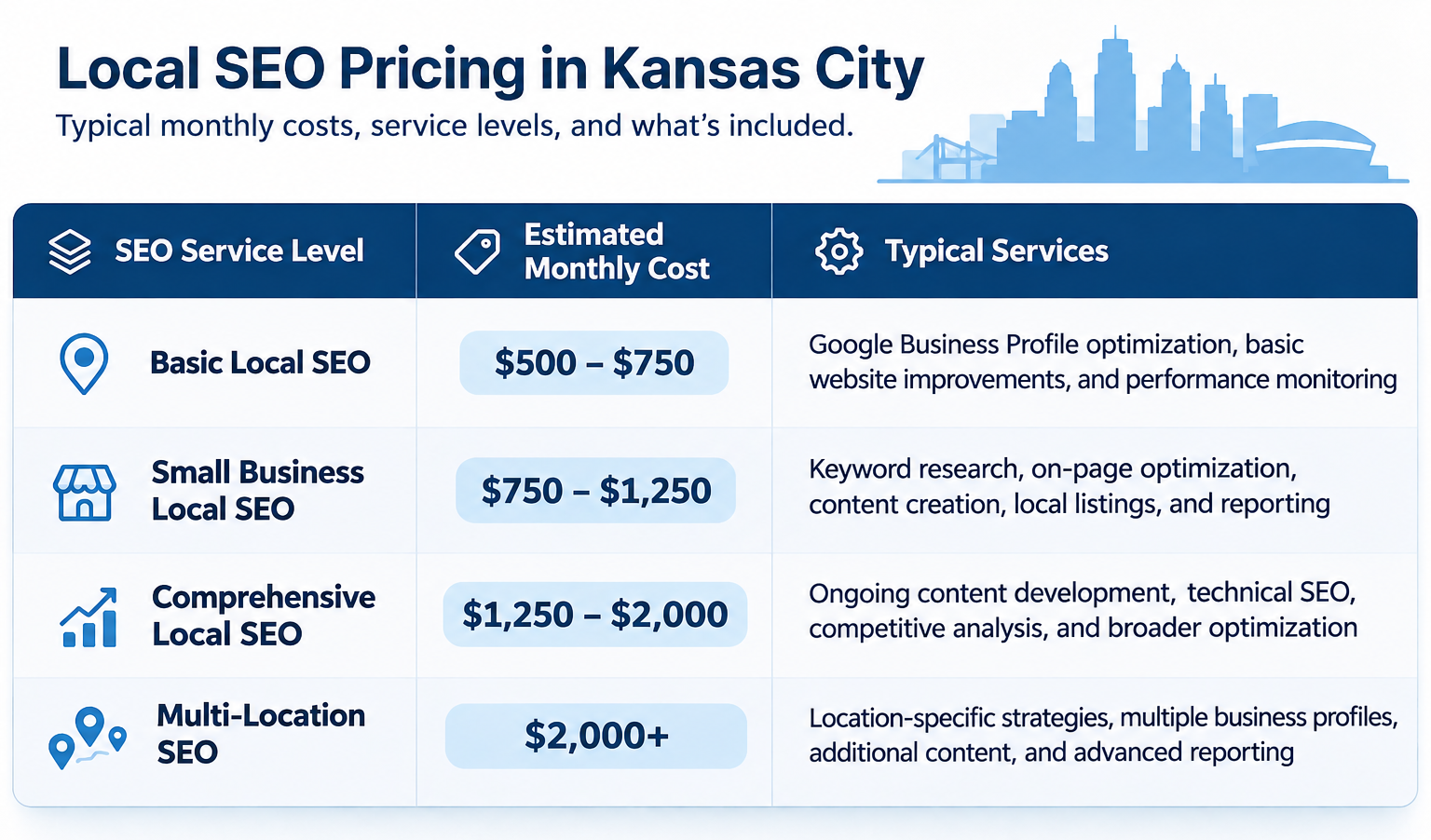
These are illustrative service ranges rather than fixed market rates. Actual pricing varies by provider and project scope.
A smaller business may only need foundational website improvements and Google Business Profile optimization, while a more competitive business may benefit from ongoing content development and technical SEO support.
For a detailed breakdown, read our guide: How Much Does Local SEO Cost in Kansas City?
How Digital Rabbit Helps Kansas City Businesses Improve Their Google Visibility
At Digital Rabbit, we help Kansas City small businesses and nonprofits build stronger websites and improve their online visibility.
We understand that most business owners don't have time to research keywords, troubleshoot technical issues, or constantly monitor Google's search results.
That's where we can help.
Our website design and SEO services focus on practical improvements that support your business goals.
Depending on your needs, our services can include:
Local SEO strategy and keyword research
Google Business Profile optimization
Website content and on-page SEO improvements
Technical SEO recommendations
SEO-focused blog content
Google Analytics and Search Console setup
Ongoing SEO monitoring and optimization
Website design and redesign
Rather than focusing exclusively on rankings, we aim to help businesses create websites that attract relevant visitors and make it easier for potential customers to take the next step.
Ready to Get Your Kansas City Business Found on Google?
If your website isn't showing up on Google, it doesn't necessarily mean you need an entirely new website.
Sometimes the solution involves correcting technical issues, improving existing content, or strengthening your Google Business Profile.
Other situations require a more comprehensive SEO strategy.
The first step is understanding what's preventing your business from appearing in relevant searches.
Digital Rabbit helps Kansas City businesses improve their websites, strengthen their local SEO, and build a more effective online presence.
Contact Digital Rabbit to discuss your website and learn how we can help more potential customers find your business online.
